Newsletters
This gives access to our in-house newsletter for the past few years.


You should already have one on your computer; most of them do, usually the original Adobe Reader. If not you may download it FREE from the Adobe website. Or, as an alternative, you might prefer a different reader (of which there are several) that are as easy as Adobe's to use but which are about a tenth the size and load much quicker. If so try the Foxit Reader for Windows, which I use myself. You can download it FREE from their website FoxitSoftware
Choose any, or all, from the selection below. Older copies, back as far as the last century, are available from the editor.
 Contact Peter Glennon about this page:
'What We Do' Main Pages:

This page, which is available to anyone who browses the site, gives access to handy information in the public domain
more
This is where, if you're not already in Rotary, you can learn more about us and can also download a Rotary membership brochure
more


To quickly see What's On in the next few weeks see the homepage. For a printable list for this year, in PDF format, see below.
more

This country, formerly known as Swaziland, is one of the principal focusses of our work overseas.
moreThe Rotary Foundation (TRF) is Rotary's own charity and, amongst other things, campaigns and raises funds for the eradication of polio from the world.
more
Friends of Rotary (or specifically of Nene Valley) are people who want to associate themselves with our aims and objectives but are not full members themselves. They support us by assisting with our charitable work or with fund-raising activities.
more



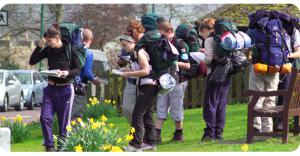

This is the committee that addresses the 'wants' (and 'needs') of young people. As well as identifying and supporting candidates at RYLA and Calvert Trust we also lead the club's flagship project, the annual Technology Tournament - q.v.
more