Club Contact Form
Please note this is one of the first pages that should be done, after you have added members. The contact form on your public site will not be displayed until this is done since there would be nowhere for any contact email to go until you've specified it!
Completing the 'contact form subjects' is quite straightforward:
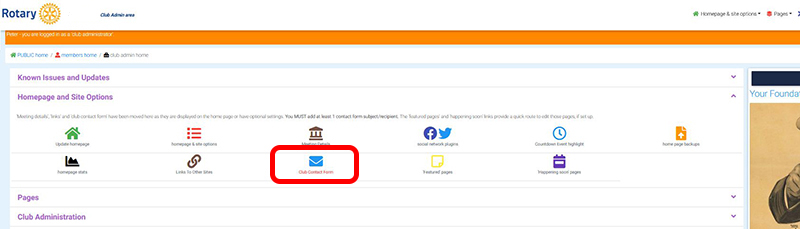
- Select ‘Club Contact Form’ from the 'Home & site options' menu (or tab shown below)
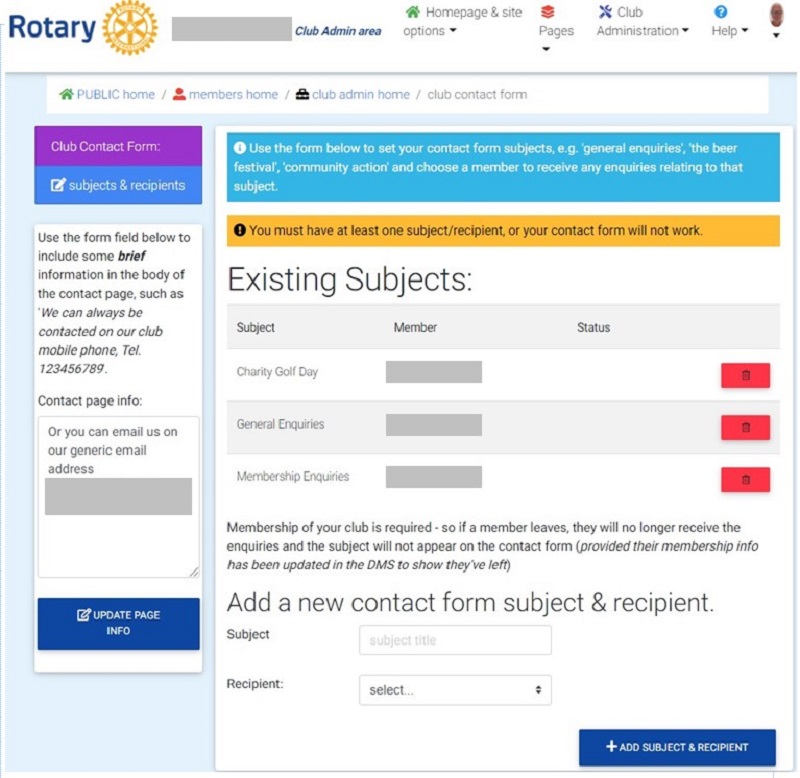
2. Enter the subject e.g. ‘General Enquiry’
3. Choose the Recipient and their email address is automatically entered. If they change address, this is updated. If they leave, the subject is removed. Only current members with an email address listed are displayed in the drop-down list.
4. Add any text you wish added to the page using the box on the left
As you add subjects, they appear on the form and can be deleted quickly.
The public 'contact' page shows the options you have entered above when the enquirer selects from the drop-down ‘choose your subject’ list.