Committees and committee members
Creating Committees
You can create as many committees as you need, with whatever names you want.
Click the 'Club Committees' menu item in the admin section. The following page will be displayed.
Note that if you are using this for the first time, no committees will be listed and need to be added!
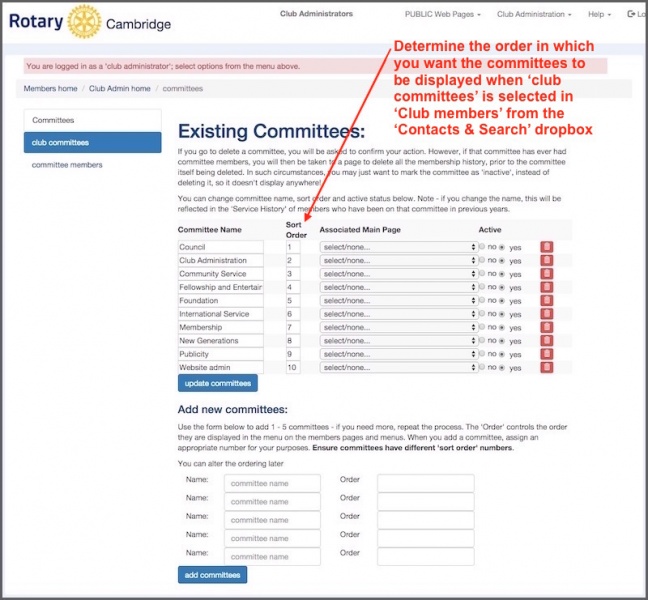
You can add up to 5 committees in one go (change the 'sort order', which controls the order they appear elsewhere) and press 'add committees'.
Committee members
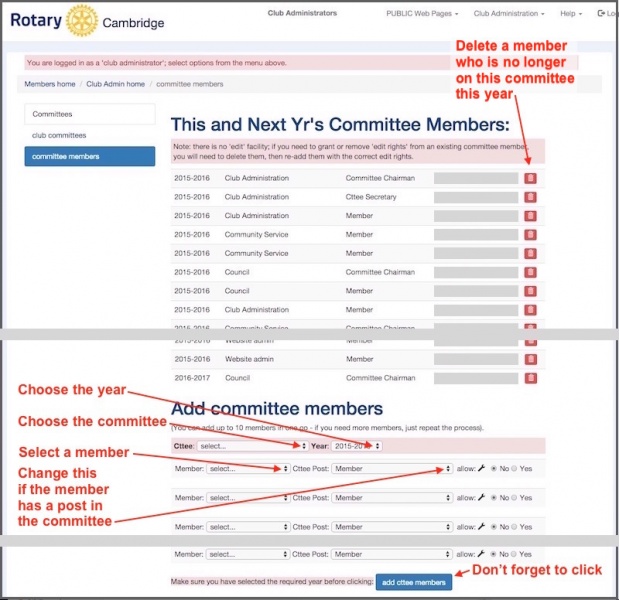
Once you have created committees, you can easily add/remove committee members by clicking on the 'Committee members' menu item..
You can also give one or more committee members 'edit access' to their committee. This allows them to add and update pages without being a club administrator.For this to work, you need to associate a 'main page' with a committee. For example, you may have a committee called 'Community Sevovie' and want to associate that with a main page called 'What we do locally'.
Committee membership is done by year. On July 1st, the start of the Rotary year, all office holders (president, secretary etc) and committee members change automatically - provided they have been entered into the database!