Adding a page
This tutorial is in four parts
- Part 1 – An Overview of adding a page
- Part 2 – A detailed look at adding a page
- Part 3 – Adding images to the web page
- Part 4 – Completing or Editing Added Pages
You can download a copy of this page as a pdf
Part 1 – An Overview of adding a page
Introduction
Whatever you want to do, there is a web-page type available for your use.
If you’re adding club weekly meetings, then choose “Weekly Meetings”. If you have a specific event or special meeting planned, then choose “Events”, if it is a club charter celebration then choose “Charter Celebrations” and if you want to report on an activity, planned or completed, then choose “What we do pages”.
The Active (see below) pages under these different headings are accessed from different places in the home page. All pages follow the same essential format, however, there are some differences in what you can do with specific pages. And the process for completing a page is a five-step process described below.
1.Add a page
2.Add details
3.Add Main Photo or image
4.Add additional photos
5.Select Display options
Adding a Page
Select the type of page from the menu shown below. You have an option to select five different page types.
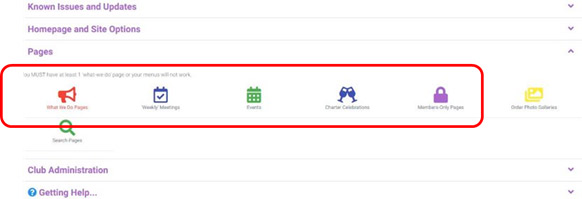
“What we do Pages” are the core of your club’s website, and how you organise these pages define the structure of your website, where pages are listed, and thus and how the public see you, so you should think about structure you want before starting to create these pages.
Selecting the Page type
The most important difference is between a general “What We Do” page and an “Event” page. “What We Do” pages can have subpages and are not displayed on the District website; they can also be designated as only accessible by members only as “Members Only” pages. While Event pages cannot have subpages but can be displayed on the District website if you so choose.
The “Weekly meeting” and “Charter celebration” are variants of the “Event” page so have similar inputs. When adding ‘weekly’ meetings there is the facility to add several meetings at the same time.
|
General or “What We Do” pages |
Event Pages |
|
|
Sub pages |
Yes |
No |
|
Display on District website |
No |
Yes |
|
Page Variants |
Members Only Pages |
‘Weekly’ Meetings Charter Celebration |
In all cases having selected the type of page you want to set up you get the menu shown below and a list of pages of the same type:
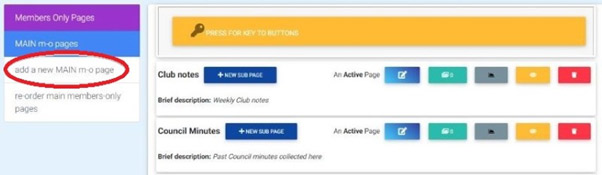
Click on “add a page”, and the first screen opens to allow the page to be set up. The layout for each page type after clicking on a page icon is similar with a left-hand menu describing in Purple your location, in Blue the menu heading and in White the options available, including usually at the top “add a new XXXX page”. To the right are existing pages under this heading and a description if it is “Active” and “Featured” i.e. if the page is available to be viewed (Active) or if it is “Featured” as part of the home page.
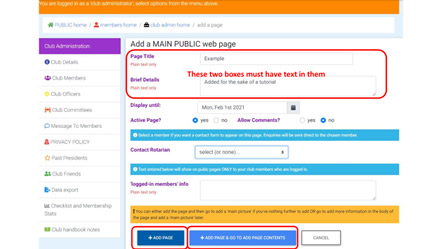
1.Add a page This first screen allows entry of the Page Title, Brief Details, Display until, Setting the page to be active or not and allowing Comments or not. If appropriate a contact can be set for the page and additional information provided to logged in members. If an “Event” then the start and finish time of the event are also entered here.
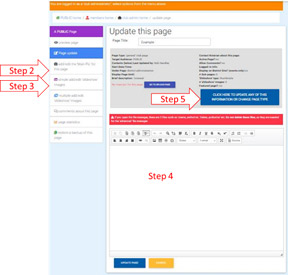
Having added the page to the website there are then editing options to get the page to look interesting and attractive, particularly to members of the public. However, not all steps need to be followed for all page types. For example, although it is good practice to include at least one image for every page, it is not generally necessary to have a slide show for the page of Club Council meeting, nor need the steps be taken in any specific order, for example the Main photo (Step 2) can be inserted after step 4 is written
1. Add Main Photo or image
2. Add additional photos to the page – must be after adding a main photo
3. Add details – such as text, tables embedded images or links
4. Display options – return to edit the details entered in stage 1 if necessary, for example to make it active, and amend the default settings of parameters such as to display as a “featured” page, display photographs as Carousel or thumbnails and other details which are not accessed during page setup.
Summary of set up for different page types
''What We Do” or general or main–club page.
These are probably the most important pages and when active will be included on the 'what we do' menu in your site. Having clicked on “add a page” the first of the two screens opens to allow the page to be set up. In setting up this page you will probably want to go through all five stages described above. If a “top level” page, i.e. not placed under another page in stage 5, it will appear under the “What we do” menu heading.
Event Page
With this Page, compared to the general “What We Do” page the additional information required is the start and end time and date of the event immediately below the title and if the page should be displayed on the District site – at the bottom of the page above the set-up page buttons. Otherwise like the “What We Do” page, adding an event is a five-step process, “adding” the page and then adding details such as text, main and additional photographs and finally deciding on the display options. Pages are listed under the relevant heading in the “Meetings and events” heading in the home page menu “hamburger”.
If you want to use the “Event Highlight feature as the top item on the Home Page, you MUST have an event page to which it can refer and link.
Weekly meetings
Weekly Meetings are shown in the 'meetings' list, but also on the home page (in the ‘happening soon’ area). The current week's meeting is also displayed in the members area of other clubs in your district - so if a member can't make your club night, he/she can see what's on elsewhere and attend a different club if they wish. You can add meetings individually or several simultaneously (using 2 different methods, depending on the type of recurrence)
- Add Several Meetings – assumes adding a variable number of weekly meetings. Input parameters are start date and time, the meeting duration and the number of meetings
- Add Multiple recurring Weekly & Council meetings – allows more flexibility in editing a table generated from a monthly cycle of recurring Club meetings. For example, different times on 1st and 3rd weeks compared to 2nd and 4th weeks or meeting only on the 2nd and 4th weeks of the month with a Social meeting on the 5th week.
In this page type it makes the website more interesting to illustrate with a single image, if one is relevant, but it is not necessary. and it is unlikely you will need to change the display settings, though you can if required. Likewise, no more than brief details may be needed. Pages are also listed under the relevant heading in the “Meetings and events” heading in the home page “burger”
'Charter Celebrations'
These occur once per year and are shown in a different area of the district site and in the members area of different clubs. Some districts have a strong tradition of celebrating the granting of the charter (the club's 'birthday') others don't. Input is similar to that for any other event. Pages are listed under the relevant heading in the “Meetings and events” heading in the home page “burger”
Members only Pages
These are basically “What We Do” or general pages, however they are only available to members who have logged into the website and cannot be accessed by the public. If associated with a committee then members can be given administration rights over these pages.
Part 2 – A detailed look at Adding a page
In this section we look at adding the different types of page first. In all cases having clicked on “add a page” the first screen opens to allow the page to be added to the database underpinning the website. This is the first step of the five-step process described above.
1. Add a page
2. Add details
3. Add Main Photo or image
4. Add additional photos
5. Display options
In the following sections the four subsequent steps to “Adding a page” above are described. These additional steps enable the page to be edited or evolve as the Club activities change or emphasis evolves.
''What We Do” or general or Main public web page.
This first screen needs text to be added to the first two boxes, Page Title and Brief details in order to add the page. The other parameters; “Display Until”, setting the page to be “Active” or not and allowing “Comments” or not can be added now or in step 5. If appropriate, a contact can be set for the page and additional information provided to logged in members, again this can be added now or in Step 5.
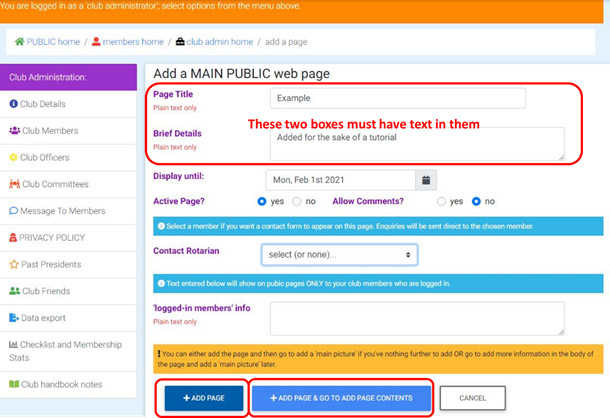
The 'brief details' field is important; not only is it used to provide information about the page on 'list' pages (future events, weekly meetings etc) it is also used as 'tooltip' text in menus - when the mouse hovers over the menu item, this text is displayed. This is a help in getting your pages indexed by the search engines, so make sure your brief details are relevant and succinct.
There is an article in the members area [ Making your Pages "Search Engine Friendly"] about how to make your pages search engine friendly
Clicking either of the blue buttons at the bottom adds the page and saves the information you have added to the database behind the website in a unique location defined by a page number and your Club website number. This is a feature of the template – nothing is saved until the “Update” or “Add Page” buttons are clicked. These are found at the bottom of the page.
The “What We Do” Menu
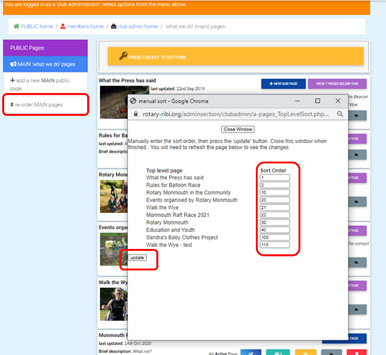
As the titles of the active “top level” (see below in stage 5) “What We Do” pages forms the sub menu of this main heading on the page menu structure you may want to reorder the pages to get the most recent or most important pages at the top of the menu. This can be done when you have completed setting up the page.
Event Page
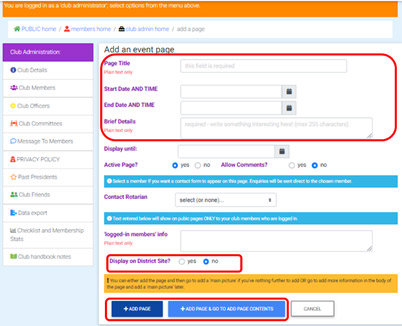
With this Page, compared to the general “What We Do” page the additional information required is the start and end time and date of the event immediately below the title and if the page should be displayed on the District site – at the bottom of the page above the set-up page buttons. Otherwise like the “What We Do” page adding an event is a five-step process, setting up the page and then adding details such as text, main and additional photographs and finally deciding on the display options.
Display on District Site – It is recommended that you do not add recurring events with a span of dates e.g. 19 March to 15 December to the District Website because your event will stay at the top of the list of events on the District Website giving you priority visibility, but causing annoyance to other clubs because their events will be relegated lower down the order on the page. Please only specify the next event in a series with its actual date and add the following recurrences as separate events with their forthcoming dates on the club page. District Website Administrators can remove Club Event postings that appear to have unfair prominence
Weekly meetings
Weekly Meetings are shown in the 'meetings' list, but also on the home page (in the ‘happening soon’ area if in the next month). The current week's meeting is also displayed in the members area of other clubs in your district – so if a member can't make your club night, he/she can see what's on elsewhere and attend a different club if they wish. You can add meetings individually or several simultaneously (using 2 different methods, depending on the type of recurrence)
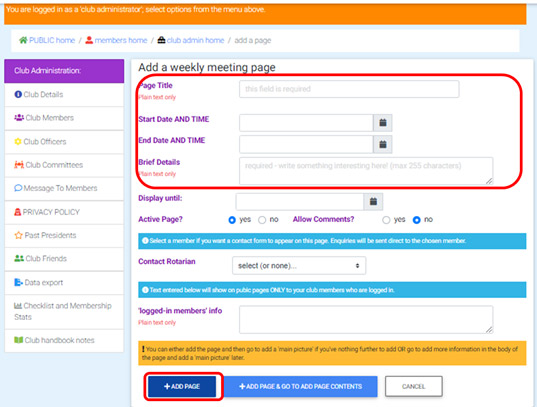
- Add Several Meetings – assumes adding a variable number of weekly meetings. Input parameters are start date and time, the meeting duration and the number of meetings
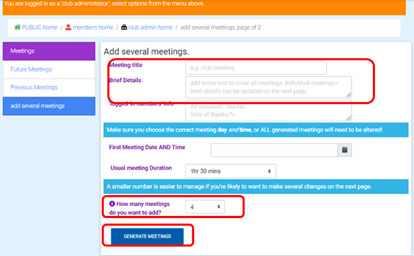
- Add Multiple recurring Weekly & Council meetings – allows more flexibility in editing a table generated from a monthly cycle of recurring Club meetings. For example, different times on 1st and 3rd weeks compared to 2nd and 4th weeks or meeting only on the 2nd and 4th weeks of the month with a Social meeting on the 5th week.
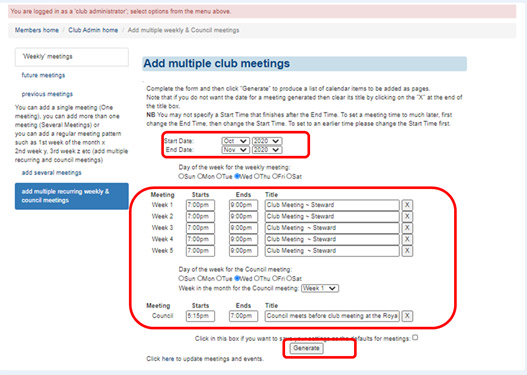
In this page type you may not need to add images or a photograph, though it will make your website more interesting if you do, or change the display settings, though you can if required.
'Charter Celebrations'
These occur once per year and are shown in a different area of the district site and in the members area of different clubs. Some districts have a strong tradition of celebrating the granting of the charter (the club's 'birthday') others don't. Input is similar to that for any other event.
Members only Pages
These are basically “What We Do” pages, that are only available to members who have logged into the website and cannot be accessed by the public. If appropriate a new page could be started as a “members only” the page can then be reviewed by Club members and before being changed to a public “What we do” page.
Having added the page to the website there are then editing options to get the page to look interesting and attractive, particularly to members of the public. These options are described in the tutorial “– Completing or Editing Added Pages”
Part 3 - please refer to 'The Main Picture'
For additional images, please refer to the 'creating carousels/slideshows' and 'working with pictures and videos' tutorials